In my Wayland setup I wanted a small label in Waybar that shows the battery level of my peripherals (mouse, headset, …). It should:
- Always show a battery glyph. (I’m not on a laptop, so it’s not there by default)
- Use the lowest battery percentage of all peripherals as the glyph.
- Show a tooltip with all peripherals and their percentages.
- Change color when any device drops below 20%.
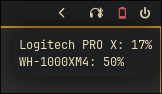
Result
Now the bar always shows a battery glyph for your peripherals, turns red when any of them are under 20%, and the tooltip lists all devices with their current percentage.
Script
upower exposes the necessary information. The script below parses its output and returns JSON for a custom/* Waybar module.
~/.config/waybar/peripheral-battery.sh:
#!/bin/bash
# Battery level below this percentage is considered low.
THRESHOLD=20
# Glyphs for 0–100%, chosen in 10% steps.
ICONS=("" "" "" "" "" "" "" "" "" "")
TOOLTIP_LINES=()
LOWEST=101
# Find peripheral devices exposed by upower and inspect each one.
while IFS= read -r device; do
info=$(upower -i "$device")
name=$(echo "$info" | grep -E "^\s+model:" | sed 's/.*model:\s*//' | xargs)
percent=$(echo "$info" | grep -E "^\s+percentage:" | grep -oP '\d+' | head -1)
[[ -z "$percent" ]] && continue
[[ -z "$name" ]] && name="$device"
TOOLTIP_LINES+=("${name}: ${percent}%")
(( percent < LOWEST )) && LOWEST=$percent
done < <(upower -e | grep -iE "mouse|headset|headphone|hid|bluetooth")
# No peripherals with battery info → hide the module.
if [[ ${#TOOLTIP_LINES[@]} -eq 0 ]]; then
echo ""
exit 0
fi
# Determine glyph based on lowest percentage.
ICON_INDEX=$(( LOWEST / 10 ))
(( ICON_INDEX > 9 )) && ICON_INDEX=9
GLYPH="${ICONS[$ICON_INDEX]}"
TOOLTIP=$(printf '%s\n' "${TOOLTIP_LINES[@]}")
CLASS=$([[ $LOWEST -lt $THRESHOLD ]] && echo "low" || echo "normal")
# Output JSON for Waybar.
jq -cn \
--arg text "$GLYPH " \
--arg tooltip "$TOOLTIP" \
--arg class "$CLASS" \
'{text: $text, tooltip: $tooltip, class: $class}'
Make it executable:
chmod +x ~/.config/waybar/peripheral-battery.sh
Waybar config
In the Waybar config:
"custom/peripheral-battery": {
  "exec": "~/.config/waybar/peripheral-battery.sh",
  "return-type": "json",
  "interval": 30,
  "format": "{}",
  "tooltip": true
}
Then add it to modules-right:
"modules-right": [
  "custom/peripheral-battery",
  "clock",
  "tray"
]
Styling
In ~/.config/waybar/style.css:
#custom-peripheral-battery {
  color: @text;
  font-size: 16px;
  padding: 0 6px;
}

#custom-peripheral-battery.low {
  color: #fb4934;
}